Observe order updates
Once an order has been placed, Withings API provides a notification system to keep you informed of any order updates.
- For order update notifications system to work properly you will need to contact your network administrator to make sure that connections from Withings IP addresses are allowed to send notifications to your endpoints. Refer to the TXT record from
ipblock-notify.withings.netfor the range(command:dig +short TXT ipblock-notify.withings.net). Withings will update this record at least one week prior to any change. Make sure you monitor it. Please contact us if your app is hosted on one of our Medical Clouds.
How to receive order update notifications
To implement the notification system, you must provide the Dropshipment notify URI in your Developer dashboard.
The notification will be sent to your dropshipment notify URL by default (no subscription required). Notifications are sent as POST calls with parameters passed in application/json format.
Description of parameters
The following table describes the POST parameters that the Withings server will send to your callback URL upon a notification request.
| Name | Type | Description |
|---|---|---|
| customer_id | string | Your dropshipment billing ID |
| customer_ref | string | Random identifier provided in Dropshipment v2 - Createorder or Dropshipment v2 - Createuserorder |
| order_id | string | Withings generated identifier used to track your order |
| status | string | Order status (only before it is shipped) |
| parcel_status | string | Parcel status (only once the order has been shipped) |
| carrier | string | Courier (only if the order has been shipped) |
| carrier_service | string | Courier service (only if the order has been shipped) |
| tracking_number | string | Tracking number (only if the order has been shipped) |
| tracking_url | string | Tracking URL (only if the order has been shipped) |
| ship_date | string | Shipping date in YYYY-MM-DD format (only if the order has been shipped) |
| is_replacement | boolean | Indicates whether or not the order is a replacement order |
| original_customer_ref | string | If this order is a replacement order, indicates the customer_ref of the original order |
| original_serial_number | string | If this order is a replacement order, indicates the serial number of the original device |
| userid | string | Withings user id of the member the device has been associated to (when the auto-association is successful) |
Possible order status (see status)
Before an order is sent to our shipping services, you will be notified of preparation updates through the status property. This property can take the following values:
| status | description |
|---|---|
| ADDRESS ERROR | The address provided is not a valid address. This status will be returned synchronously when calling the createorder or createuserorder API. If one or more orders qualify as "ADDRESS ERROR", the request will fail and the orders won't be created in Withings systems. If status returned is ADDRESS ERROR and you still want Withings to process the order, please retry the request and use the force_address option in the order model. |
| CREATED | The order has been created with address verification bypassed (force_address=true). Withings logistics will attempt to ship to the provided address without prior validation. |
| VERIFIED | The address provided is a valid address. |
| PROCESSING | The order was received by Withings logistic team which is processing it. |
| FAILED | The order failed to be sent to Withings logistics team. |
| OPEN | The order was successfully processed by Withings logistics team and is waiting to be sent to parcel service. |
| SHIPPED | The order was sent to the provided address. This status only indicates the parcel was sent, not that it was delivered. |
| TRASHED | The order has been cancelled. This status will be returned through order update notification. Please contact Withings if you think your order has been cancelled by mistake. |
| BACKHOLD | The order is on hold. This can happen for different reason (unavailable product, delays in supply chain...). |
To better understand the life cycle of an order and the possible status sequences, please refer to the diagram below:
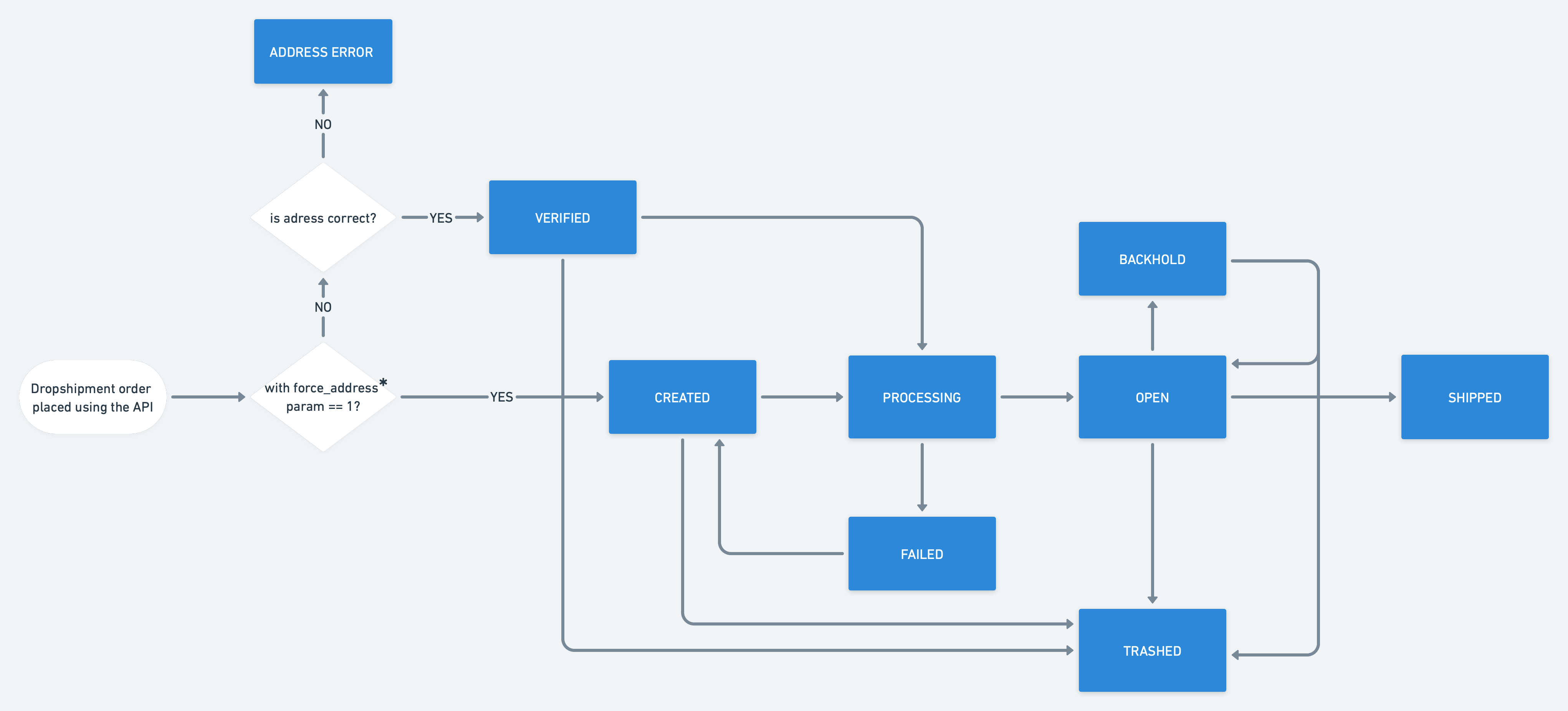
*more info about the force_adress parameter can be found here
Possible delivery statuses (see parcel_status)
Once the order has been transmitted to the shipping service, you will be notified of delivery updates through the parcel_status property. This property can take the following values :
| parcel_status | description |
|---|---|
| pending | No delivery event has been received for this package yet. It might not be yet handled to the shipping carrier, or the carrier didn't register it in its IT system yet |
| info_received | Shipping carrier acknowledged the creation of the shipping label but the package is not yet in its shipping network |
| in_transit | Shipping has started and the package is in transit |
| failed_attempt | A delivery attempt occurred but the package could not be delivered. It is still in the shipping carrier's network |
| exception | An exception occurred. Most of the time, it will be a delivery incident |
| delayed | The package is still in transit but it has exceeded its expected delivery date |
| pickup | The package is available for retrieval at a pickup point |
| delivered | The package has been delivered or collected from a pickup point |
| return | The package will be returned to sender. We will continue retrieving events for 5 days after the first return event |
| expired | The package was created more than 45 days ago but is still not delivered. We will not look for more events for this package. Possible causes are:
|